- Per Dawn 16.0.0's theme source, the product-page Sale badge uses the compare-at price and price of the variant whose price is shown; collection cards decide from product-level prices and hide the sale badge for unavailable products. Merchants who only need that native label can stop there.
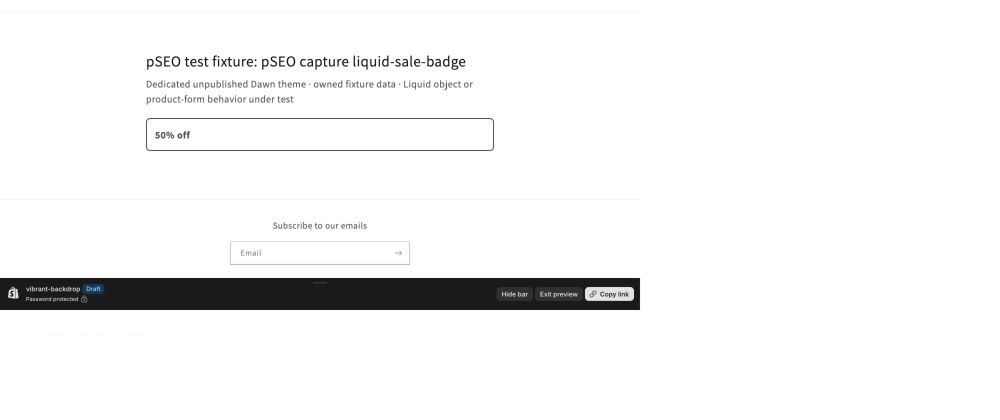
- Tested in a standalone section only: Dawn 16.0.0 rendered a 50% off badge from a $20.00 compare-at price and $10.00 price on 2026-09-16.
- By its code (not tested with discounts active), the percentage reads only a variant's price and compare-at price, so it does not reflect discount codes, automatic discounts or checkout calculations.
- The product-page snippet, the rounding option, the 'up to' method and any collection-card version are guidance and were not tested.
- Per Shopify's Help Center, an incompatible theme update can remove all code changes in the updated copy, so keep copies of your edits and re-apply them if the updated copy's theme card says they could not be included.
Per Dawn 16.0.0's theme source, the product page already has a native Sale badge for compare-at pricing, so merchants who only need that label can stop there. The product-page badge uses the prices of the variant whose price is shown; collection cards use product-level prices and hide the sale badge for unavailable products. For merchants comfortable editing and maintaining a duplicated Dawn theme, a short Liquid snippet (guidance, not tested) is the better choice for replacing the product-page Sale text with a percentage. An app is the better fit when you need percentage badges on collection cards, badges driven by Shopify discounts, or scheduled sales, or when nobody can maintain theme code.
01 What Shopify and Dawn already do
Sale pricing is built in. You enter the original price in Compare-at price and the lower price in Price. Shopify's sale pricing guide says both amounts can appear on product and collection pages, but only the sale price shows at checkout. The guide adds that your theme "might add a badge with a message or percentage off."
Dawn's badge is a message. Its snippets/price.liquid outputs a Sale badge and a Sold out badge whenever a section asks for badges, and its assets/component-price.css shows the Sale badge only when the displayed price is on sale. Dawn's theme settings schema defines Badges settings for badge position and the sale and sold-out color schemes. Edit default theme content can reword "Sale" in your default language. None of these options calculates a percentage, and that is the gap this page fills.
02 How the percentage is worked out, and what was tested
The badge uses two numbers from a single variant: its compare-at price and its price. The calculation subtracts the price from the compare-at price, multiplies by 100, then divides by the compare-at price. The order matters, because dividing before multiplying would round almost every discount down to 0.
The calculation reads only those two fields. It does not calculate checkout discounts, and it ignores discount codes and automatic discounts. In Shopify's own words, "Using sale prices is different from setting up discounts."
The evidence for this approach is narrow. Dawn 16.0.0 rendered a 50% off badge from a $20.00 compare-at price and $10.00 price on 2026-09-16. That test used a standalone section, not the product-page installation described below. It did not cover the no-sale fallback, uneven division, variant switching or collection placement.
Because 50 divides evenly, the test can't show how rounding behaves. Shopify's variant reference expresses price and compare_at_price in the currency's subunit: $19.99 is the integer 1999 in Liquid, not the decimal 19.99. Shopify's divided_by reference says the result takes the type of the divisor: an integer divisor gives an integer result, and a float divisor gives a decimal. Dividing by the integer compare-at price therefore rounds down. The rows below are arithmetic based on that documented behavior, not test results:
| Compare-at → price | Percentage (to two decimal places) | Floor (integer divisor) | Nearest (float divisor + round) |
|---|---|---|---|
| $30.00 → $10.00 | 66.67% | 66% | 67% |
| $19.99 → $10.00 | 49.97% | 49% | 50% |
Rounding down never overstates a discount, so the guidance below keeps it. Below a 1% saving the integer result is zero; the proposed adaptation uses Dawn's native Sale text in that case instead of showing 0% off. With the optional nearest-percent formula, the same fallback applies whenever the rounded result is zero. Neither fallback was tested.
03 Guidance, not tested: show the percentage on Dawn's product page
None of the steps in this section were tested. The code is written against Dawn 16.0.0's price.liquid, so compare it with your own file before editing. It replaces Dawn's Sale text rather than adding a second badge.
1. Back up. In Online Store → Themes, duplicate your theme, then choose … → Edit code on the copy.
2. Add a snippet. Under Snippets, create percent-off-badge.liquid:
<span class="badge price__badge-sale color-{{ settings.sale_badge_color_scheme }}">
  {%- if sale_variant.compare_at_price > sale_variant.price -%}
    {%- assign discount_percent = sale_variant.compare_at_price | minus: sale_variant.price | times: 100 | divided_by: sale_variant.compare_at_price -%}
    {%- if discount_percent > 0 -%}
      {{ discount_percent }}% off
    {%- else -%}
      {{ 'products.product.on_sale' | t }}
    {%- endif -%}
  {%- else -%}
    {{ 'products.product.on_sale' | t }}
  {%- endif -%}
</span>
3. Replace the Sale span. In snippets/price.liquid, find {%- if show_badges -%}. Replace only its first span, the one with the price__badge-sale class, so that the block reads as shown below. This code must stay inside price.liquid, because its callers pass use_variant and product as render parameters, and price.liquid assigns the local target. Per Shopify's render tag reference, snippets can't read variables created outside them unless those variables are passed as parameters, so target is passed to the snippet as sale_variant.
{%- if show_badges -%}
  {%- if use_variant and product.quantity_price_breaks_configured? != true -%}
    {%- render 'percent-off-badge', sale_variant: target -%}
  {%- else -%}
    <span class="badge price__badge-sale color-{{ settings.sale_badge_color_scheme }}">
      {{ 'products.product.on_sale' | t }}
    </span>
  {%- endif -%}
  <span class="badge price__badge-sold-out color-{{ settings.sold_out_badge_color_scheme }}">
    {{ 'products.product.sold_out' | t }}
  </span>
{%- endif -%}- One variant, one pair of prices — When
use_variantis set,targetis the selected variant, otherwise the first available variant, otherwise the first variant. The native span stays for callers withoutuse_variant, wheretargetis the whole product and its lowest price and lowest compare-at price can come from different variants, and for products with quantity price breaks, where one price pair doesn't describe what the shopper pays. - Visibility unchanged — The span keeps the
badge,price__badge-saleand color-scheme classes. Dawn's CSS should still show it only when the price is on sale (expected from the source; not tested). The regular price line and the struck-through compare-at and sale price lines are toggled by theprice--on-saleclass on the.pricecontainer, which this edit does not change, so price display should be unchanged (expected from component-price.css; not tested). The edit leaves Dawn's existing price markup and sold-out badge in place. In Dawn 16.0.0's price snippet, the struck-through compare-at amount is omitted when all variants have the same price but their compare-at prices vary (product.price_varies == false and product.compare_at_price_varies). A variant with a compare-at saving can therefore have a percentage badge without a visible reference amount. This source-derived case was not tested. If your design requires that reference amount beside every percentage, it needs a separate price-markup change. Dawn 16.0.0's component-price.css has no rule that hides the sale badge on a sold-out variant. Per that stylesheet, a sold-out variant priced below its compare-at price can show Sold out alongside the sale badge, native or percentage. That combined state was not tested. - Where it applies —
price.liquidis shared across the theme. The new branch runs in sections that pass bothuse_variantandshow_badges, for products without quantity price breaks (expected from the source; not tested), including main-product.liquid and featured-product.liquid. Collection cards pass neither, so they are unaffected. - Variant changes — When a shopper changes options, Dawn's
assets/product-info.jsre-fetches the section and replaces the contents of the price wrapper, so Liquid should recalculate the badge. Variant switching was not tested. - Wording — "% off" is hard-coded English. Following Shopify's storefront locale file guidance, add
"percent_off": "{{ percent }}% off"under the existingproducts.productobject inlocales/en.default.jsonand each other storefront locale file (locales/*.json, excluding*.schema.jsontheme-editor files). Use translated text for each language and keep the JSON commas valid. Then output{{ 'products.product.percent_off' | t: percent: discount_percent }}in place of the hard-coded text.
To round to the nearest whole percent instead of rounding down, replace the snippet's assign line with the two lines below. Adding Shopify's round filter after an integer division has no effect, because the value is already a whole number. Nearest rounding can overstate a discount by less than one point: $19.99 → $10.00 shows 50% for a 49.97% discount, which is why the floor formula is the default.
{%- assign compare_at_float = sale_variant.compare_at_price | times: 1.0 -%}
{%- assign discount_percent = sale_variant.compare_at_price | minus: sale_variant.price | times: 100 | divided_by: compare_at_float | round -%}
4. Preview the duplicated theme. The integration is untested guidance. Use suitable test products to check all of these cases in your copy:
- Switch between discounted and regular-price variants, including a variant without a compare-at price; check both the displayed price and badge.
- Check a sold-out variant priced below its compare-at price, including both the sale and Sold out badges.
- Check a product whose variants all have the same price but different compare-at prices. Dawn can omit the struck-through reference amount even when the selected variant is on sale; decide whether that price display meets your requirements.
- Check an uneven percentage against the floor calculation, or the nearest-percent option if you added it. Include a saving below 1% (and below 0.5% for nearest rounding) to check the native Sale fallback.
- If you use quantity price breaks, confirm that those products retain the native Sale text.
- Check collection cards and any other section calling
price.liquid; the custom branch applies only withuse_variantandshow_badges, without quantity price breaks. - If you added locale keys, preview each supported storefront language and check the percentage text.
Publish only after those checks pass on your theme. If a relevant state fails, keep the current live theme while you correct the duplicate.
04 Guidance, not tested: "Up to" badges, collection cards and updates
"Up to X% off." The snippet describes one variant and appears next to that variant's price. A claim about the whole product needs a different method. Shopify's product object documents fields such as price_min and compare_at_price_max as the lowest or highest value across all variants, so each value can come from a different variant. Suppose a product has a $10.00 variant with no compare-at price and a $50.00 variant with a $60.00 compare-at price. Pairing the highest compare-at price with the lowest price gives 83%, yet the only discounted variant is about 17% off. The correct method is to loop over product.variants, work out each eligible variant's percentage from its own two prices, and show the highest. Decide whether sold-out variants should count. Without pagination, product.variants returns at most 250 variants.
Collection cards. Dawn's snippets/card-product.liquid builds its own badge from product-level prices: it shows Sold out for an unavailable product, and Sale when an available product's compare-at price is above its price. It never uses the badge block edited above, so collection grids keep Dawn's Sale badge. A percentage on cards needs a separate implementation, and it faces the same mixed-variant problem.
Theme updates. Shopify's Edit theme code guide warns that if your code changes are incompatible with a theme update, all of them are removed in the updated copy. Putting the code in its own snippet does not guarantee it survives an update. Save copies of the snippet, the price.liquid change and any locale keys before you update. Per Shopify's Updating themes guide, when you add a theme update, Shopify adds it to your theme library as a draft named "Updated copy of" your theme; the live theme is unchanged until you publish that copy. Check the updated copy's theme card; if it says code edits could not be included, re-apply the saved snippet, price.liquid change and locale keys to the "Updated copy of" draft, preview, then publish.
05 When an app is the better buy
For a merchant comfortable maintaining a duplicated Dawn theme, the proposed snippet is the no-app option for a product-page compare-at percentage (guidance, not tested). An app is the better buy if any of the following apply. Listing details as of September 17, 2026.
- Labels on collection cards — You need labels on collection-product images and do not want to maintain a second
card-product.liquidimplementation. DECO Product Labels & Badges supports this placement: its vendor describes percentage-off labels on collection and product images; its badge documentation describes configuring editable text badges in the app. The snippet in this guide does not change collection cards. - Badges driven by Shopify discounts — A compare-at calculation does not include savings from automatic discounts or discount codes; it can still show a separate compare-at saving. Show Discount: Dynamic Pricing advertises badges synced with Shopify discounts, with product-page badges on its free plan and collection-page and product-card badges on its $24.99/month Pro plan. Its listing shows no reviews.
- Scheduling and targeting — DECO Product Labels & Badges (listing rating 5.0 from 1,683 reviews) targets badges by variant, collection or discount. Its free plan allows up to 4 labels on 20 products, and scheduling starts on the $19/month Growth plan; its listing adds $20/month for Shopify Plus stores. Heartcoding Sales & Discounts (listing rating 4.9 from 494 reviews, Built for Shopify) combines per-product percentage badges with scheduled sales, starting at $9.99/month for up to 10,000 discounted products per 30 days.
- A different theme or no maintainer — You run a non-Dawn or heavily modified theme, or nobody can re-apply the code after an update.
- Language targeting — You want to show a badge for a specific storefront language: DECO lists showing badges on a specific language.
06 Conclusion
If "Sale" is enough, Dawn already provides it. For a percentage on a Dawn product page, a small snippet on a duplicated theme (guidance, not tested) is a better choice than an app if you are comfortable editing it and checking whether the changes need to be re-applied after theme updates. The proposed replacement requires both use_variant and show_badges, on products without quantity price breaks. Price blocks that pass show_badges without use_variant, and products with quantity price breaks, keep Dawn's native Sale text. Collection cards are unaffected: they do not pass show_badges to price.liquid and keep the separate Sale and Sold out badge from snippets/card-product.liquid. The code keeps the sold-out markup and sale visibility classes; badge visibility is expected to follow Dawn's stylesheet; the product-page installation was not tested. Treat it as untested guidance, because the only tested result is a standalone 50% badge from a $20.00 compare-at price and a $10.00 price. "Up to" claims and collection cards need separate implementation work. For collection-card percentage labels, badges driven by Shopify discounts, scheduled sales or a theme without a code maintainer, consider the corresponding app options above.
07 Frequently asked questions
- Does Dawn show a sale badge without any code?
- Yes. Dawn 16.0.0's theme source shows that on the product page the native Sale badge appears when the compare-at price of the variant whose price is shown is higher than its price, while collection cards decide from product-level prices and hide the sale badge for unavailable products. Shopify's sale pricing guide covers setting a compare-at price above the price and explains that badge presentation varies by theme; Dawn uses a text label. Theme settings control badge position and color schemes, and Edit default theme content can reword Sale in your default language, but none of these options shows a percentage. This comes from the theme source and Shopify's documentation, not from a test on this page.
- Will a percent-off badge update when a shopper picks another variant?
- It should, but this is untested guidance: Dawn 16.0.0's product-info.js replaces the contents of the section's price wrapper with server-rendered markup when options change, so the rendered snippet should recalculate. The entire proposed installation was not tested. Its custom branch requires use_variant and show_badges, on products without quantity price breaks, with the separate percent-off-badge.liquid snippet rendered from price.liquid using sale_variant: target. The captured test only demonstrated a standalone 50% badge from a $20.00 compare-at price and a $10.00 price.
- Does the badge include discount codes or automatic discounts?
- No. By its code, the calculation reads only a variant's price and compare-at price, so it does not include discount codes, automatic discounts or checkout calculations; a store using discounts can still show a separate compare-at saving. Shopify's Help Center notes that sale prices are different from discounts. Behavior with active discounts was not tested; the only tested result is a standalone 50% badge from a $20.00 compare-at price and a $10.00 price. If your savings come from discounts, an app that syncs with Shopify discounts is a better fit.
- Will a 66.67% discount show as 66% or 67%?
- Based on Shopify's variant, divided_by and round documentation, not on a test: Liquid prices use integer currency subunits ($19.99 is 1999), so dividing by compare_at_price rounds down and a 66.67% discount displays as 66%. Converting that divisor to a float with times: 1.0 before division and then applying round gives 67%. Nearest rounding can overstate a discount by less than one point ($19.99 → $10.00 shows 50% for a 49.97% discount), which is why rounding down is the default. The captured test covered only an even 50% case, so rounding was not tested. For a computed result of zero, the proposed adaptation keeps the native Sale label; that fallback was not tested.
- Will my edit survive a Dawn theme update?
- Not necessarily. Shopify's Edit theme code guide says that if your code changes are incompatible with an update, all of them are removed in the updated copy. Putting the code in its own snippet does not guarantee it survives an update. Keep copies of the snippet, the price.liquid change and any locale keys, check the updated copy's theme card, and re-apply them if it says code edits could not be included. This is documented guidance; theme updates were not tested.